
Last updated on
Nov 6, 2026
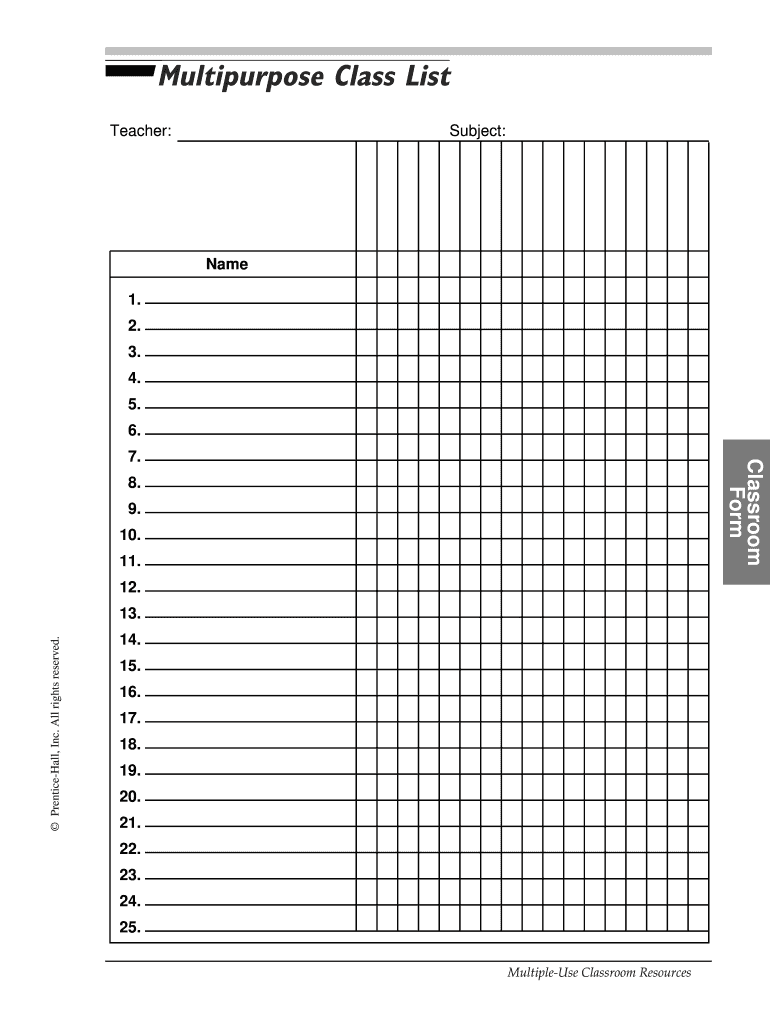
Get the free Multipurpose Class List Form
We are not affiliated with any brand or entity on this form

Fill out
Complete the form online in a simple drag-and-drop editor.

eSign
Add your legally binding signature or send the form for signing.

Share
Share the form via a link, letting anyone fill it out from any device.

Export
Download, print, email, or move the form to your cloud storage.
Why pdfFiller is the best tool for your documents and forms


End-to-end document management
From editing and signing to collaboration and tracking, pdfFiller has everything you need to get your documents done quickly and efficiently.
Accessible from anywhere
pdfFiller is fully cloud-based. This means you can edit, sign, and share documents from anywhere using your computer, smartphone, or tablet.
Secure and compliant
pdfFiller lets you securely manage documents following global laws like ESIGN, CCPA, and GDPR. It's also HIPAA and SOC 2 compliant.
What is Class List
The Multipurpose Class List Form is an educational document used by teachers to record student names and subjects in a classroom setting.
pdfFiller scores top ratings on review platforms




Simple to follow. Came in handy for speed and accuracy of documents.
Due to multiple errors that I made
Due to multiple errors that I made, it was easy for me to fix the errors.
Who needs Class List?
Explore how professionals across industries use pdfFiller.

Class List is needed by:
-
Teachers managing classroom data
-
School administrators tracking attendance
-
Educational institutions maintaining academic records
-
Teacher trainers providing classroom resources
-
Parents seeking information on student enrollment
-
Students needing clarity on class subjects
Comprehensive Guide to Class List
What is the Multipurpose Class List Form?
The Multipurpose Class List Form is a crucial tool used by educators to streamline classroom management. This form serves to systematically track student names and associated subjects within educational settings. By providing a clear structure, it enhances the organization of student data and improves overall classroom efficiency. Teachers can effectively manage attendance and subject assignments, ensuring they remain informed about each student's academic focus.
Benefits of Using the Multipurpose Class List Form
Utilizing the Multipurpose Class List Form offers numerous advantages for both teachers and educational institutions. It significantly streamlines the process of recording attendance and subject assignments, fostering a more organized classroom environment. By reducing the administrative workload on educators, this form allows them to dedicate more time to teaching rather than paperwork. Furthermore, clear and organized records facilitate improved communication between educators, students, and parents.
Key Features of the Multipurpose Class List Form
The Multipurpose Class List Form boasts several essential features that contribute to its usability in educational settings. Key attributes include:
-
Dedicated sections for the teacher's name, subject, and multiple student names
-
Fillable and customizable template options for various classroom needs
-
Compliance with established classroom management practices
Who Needs the Multipurpose Class List Form?
This form is particularly beneficial for various educational stakeholders. Specifically, it is designed for:
-
Teachers across different educational settings
-
School administrators responsible for managing class rosters
-
Educators involved in tracking student attendance and performance
How to Fill Out the Multipurpose Class List Form Online
Completing the Multipurpose Class List Form online is a straightforward process. Follow these steps to ensure accuracy:
-
Access the form on pdfFiller.
-
Fill in the required fields, including the teacher's name, subject, and student names.
-
Save and edit the filled-out form as necessary.
Common Mistakes to Avoid When Using the Multipurpose Class List Form
Avoiding common errors is crucial for the effective use of the Multipurpose Class List Form. Common mistakes include:
-
Leaving fields incomplete, which can lead to confusion
-
Failing to verify the accuracy of student names and subjects
-
Neglecting to review the completed form prior to submission
How to Save and Print the Multipurpose Class List Form
Managing the completed Multipurpose Class List Form requires proper saving and printing techniques. To handle your form effectively:
-
Download the completed form as a PDF.
-
Follow the instructions for printing to ensure physical records are available.
-
Store electronic copies securely for future reference.
Security and Compliance Features of Using pdfFiller for the Multipurpose Class List Form
When utilizing pdfFiller to manage the Multipurpose Class List Form, users can be assured of robust security measures. Key features include:
-
256-bit encryption to protect sensitive information
-
Compliance with HIPAA and GDPR regulations
-
Benefits of a cloud-based document management system for sharing completed forms
Enhancing Classroom Management with the Multipurpose Class List Form
The Multipurpose Class List Form plays a vital role in enhancing classroom management strategies. When integrated into daily routines, it helps educators maintain organization and efficiency. Use cases demonstrate how this form improves tracking capabilities and allows for better communication with students. Feedback from users highlights its effectiveness in facilitating smoother classroom operations.
Experience Seamless Classroom Management with pdfFiller
Adopting pdfFiller for educational document management can transform the way teachers handle forms like the Multipurpose Class List Form. With features that simplify filling out, signing, and organizing forms, pdfFiller stands out as a practical solution for educators. Users are encouraged to explore additional educational templates and try pdfFiller free to enhance their classroom management experience.
How to fill out the Class List
-
1.Start by accessing pdfFiller’s website and logging into your account. If you do not have an account, create one using an email address or social media login.
-
2.Once logged in, use the search function to find the 'Multipurpose Class List Form'. Click on the form to open it within the pdfFiller platform.
-
3.Before filling out the form, gather necessary information such as the teacher’s name, subjects being taught, and a list of student names. It’s helpful to have this information readily available.
-
4.In the pdfFiller interface, locate the blank fields where information is required. Click on each field to input text. Type the teacher’s name in the designated area followed by the subject being taught.
-
5.Next, move on to the list of student names. For each student, click on the appropriate line and enter their full name clearly to avoid any confusion.
-
6.Take a moment to review all the filled-in fields. Ensure that the spelling of names is correct and that each subject has been assigned to the appropriate teacher entry.
-
7.Once you’ve confirmed that all information is accurate, navigate to the options for saving and submitting your form. You can save it on your device or choose to submit it directly through pdfFiller.
-
8.To save your completed form, look for the 'Save' or 'Download' button. Click it to download a PDF copy for your records, or opt for direct sharing with colleagues or administrators.

Who can use the Multipurpose Class List Form?
This class list form can be used by teachers, school administrators, and educational institutions to track student attendance and manage classroom data effectively.
Is there a deadline for submitting this form?
While there are no specific deadlines for submitting the Multipurpose Class List Form, it's best to complete it at the start of each academic term for accurate record-keeping.
What information is required to complete the form?
The form requires the teacher's name, the subject being taught, and a comprehensive list of student names to ensure proper tracking and management.
Can I edit the form after saving it?
Yes, if you need to make changes after saving, you can reopen the form in pdfFiller, edit the necessary fields, and save your updates.
What are common mistakes to avoid when filling out the form?
Ensure you spell student names correctly and double-check that each subject corresponds accurately to the teacher's name to avoid confusion.
How do I submit the completed form?
You can submit the form through pdfFiller directly or download it and then send it via email or print it for physical submission to the necessary parties.
Are there any fees associated with using the Multipurpose Class List Form?
There are no fees associated with using the form itself; however, there may be fees for services offered by pdfFiller for additional form processing or features.
Related Forms


Related Catalogs
Get the latest insights from our blog


If you believe that this page should be taken down, please follow our DMCA take down process
here
.
This form may include fields for payment information. Data entered in these fields is not covered by PCI DSS compliance.